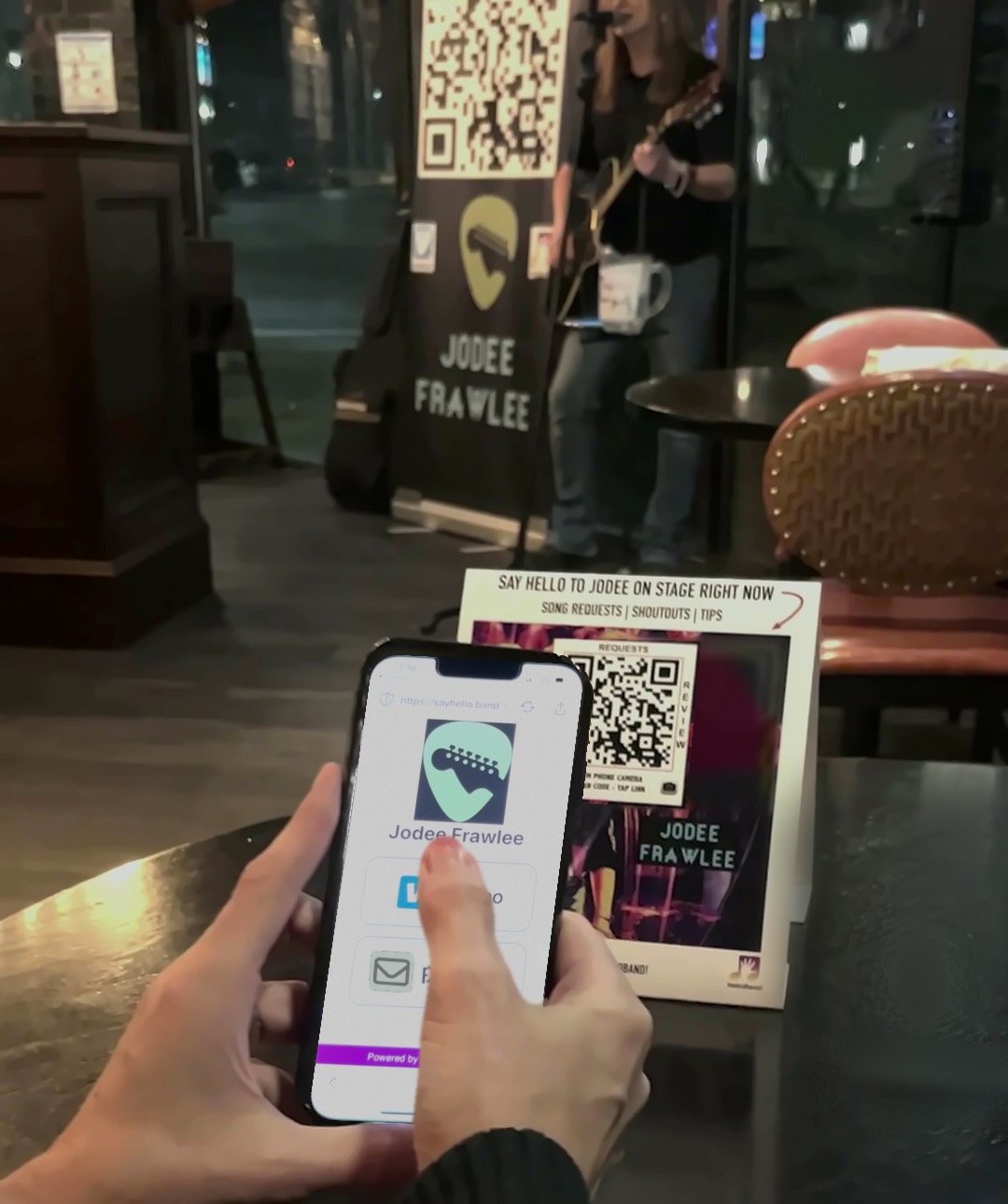
How to Build a Fan Email List at Live Shows
Musicians can build a fan email list at live shows by displaying a QR code that opens a mobile signup page, giving listeners a clear reason to subscribe, and mentioning it between songs. Follow up with useful show updates so that a great night becomes an ongoing connection.
Someone hears your band for the first time. They stay for another song, bring a friend closer to the stage, and ask where you are playing next.
That is the moment to make staying connected easy.
An email list gives interested listeners a way to hear from you after they leave the venue. For working bands, solo musicians, duos, and DJs, it can start with a simple habit: invite people to join while they are enjoying the show.
Here is how to make that habit part of your next gig.
Why should musicians build an email list at live shows?
A live show introduces your music to people who may never have searched for you online. An email signup gives those listeners a direct way to receive your news without having to remember your name and find you later.
Social media still has a role. Fans may enjoy your clips, comment on photos, and share your upcoming dates. An email list adds another way to reach people who have specifically asked to hear from you.
The goal is not to collect the largest possible database. It is to build a list of people who want your next show announcement, new release, or occasional update.
Start with a promise you can keep: “Join our list for upcoming shows and new music.”
How do you collect fan email addresses with HelloBand?
HelloBand's Follow feature lets fans submit their name, ZIP code, and email address from your performer landing page. They scan your QR code, open the page in their phone's browser, and tap Follow. Fans do not need to download the HelloBand app or create an account to access the page.
The performer manages the fan information through the app. This makes email signup part of the same experience fans can use to explore your act.
Learn more about HelloBand's fan engagement tools for musicians.
What should you set up before the show?
1. Give fans a specific reason to subscribe
“Join our mailing list” explains the action. “Find out when we are playing here again” explains the benefit.
Match your invitation to your act:
- Cover band: Get upcoming dates and special theme-night announcements.
- Original artist: Hear about new releases and local shows.
- Acoustic duo: Find our next restaurant, brewery, or patio performance.
- DJ: Get details about upcoming sets and special events.
You do not need a giveaway to make the invitation useful. Start with information your audience already wants, and avoid promising exclusive content unless you plan to deliver it.
2. Make the signup option easy to find
Open your fan page on a phone and look at it as a first-time visitor. Is your act's name recognizable? Is it obvious how to join your list? Does the wording explain what subscribers will receive?
If you use HelloBand, make your stage invitation match the interface: tell listeners to tap Follow to join your email list. “Follow us” by itself could be mistaken for an instruction to find a social profile.
3. Test the complete experience
Scan your printed code, open the page, and try the signup process before the audience arrives. Test from the distance and lighting conditions your audience will encounter.
A code that works on your laptop screen may be harder to scan from a dark table across the room. Check the physical setup, not just the artwork.
For initial setup help, use the HelloBand Quickstart guide.
Where should you display your QR code at a gig?
Put the code where people can notice it, understand it, and comfortably scan it. A distant stage banner can help people recognize the code, while a table card gives them a closer place to act.
PlacementHow to make it usefulTable tents or cardsAdd a short invitation to receive future show dates.Merchandise tableGive people browsing your merchandise another way to stay connected.Stage sign or bannerPoint to it when you mention the signup during the set.Take-home cardLet listeners join later if they prefer to keep their phones away during the show.
Coordinate placements with the venue, and keep signs clear of walkways and equipment access. Avoid covering the code with decorative graphics or placing it where glare makes scanning difficult.
HelloBand offers QR code table tents, cards, posters, and stage displays for performers who need printed materials.
What should you say from the stage to get signups?
Use a short invitation that explains the benefit and the next step. A natural pause between songs is a good time to mention it.
For future show dates:
“Want to know when we're playing here again? Scan the code on your table and tap Follow to join our email list. We'll send you our upcoming dates.”
For an original artist:
“If you liked that song, scan our code and tap Follow. Join our email list for new releases and upcoming shows.”
Before the final song:
“Thanks for spending your night with us. Before you head out, scan the code and tap Follow if you'd like to hear about the next show.”
Try an invitation early enough that people have time to respond, then a brief reminder near the end. Adjust to the room. The announcement should feel like part of the conversation with your audience.
Can song requests and tips also lead fans to your signup page?
Yes. HelloBand puts fan interactions on one landing page, so someone visiting to send a request or find a tipping option can also discover the Follow option. Its other features include messaging, upcoming gigs, social links, and custom website links.
A visit is an opportunity to invite a signup, but it is not a signup by itself. Keep joining the email list a clear, voluntary choice. Do not treat a song request or tip as permission to send ongoing promotional email.
Give listeners a reason to engage in the moment and a separate reason to stay connected afterward.
What should musicians email fans after a show?
Start with a brief thank-you that helps subscribers remember where they heard you. Then give them one useful next step, such as checking your next local date or listening to a song from the set.
For example:
Subject: Thanks for being part of Friday's show
It was great sharing a night of music with you at The Lantern Room. Thanks for joining our list. Our next show there is November 6, and we'd love to see you again. You can find the details on our show page.
This is an illustrative example; replace the venue, date, and destination with your actual details.
For later emails, focus on a clear reason to write:
- A performance your subscribers may want to attend.
- A new song or video they can listen to.
- A meaningful update about the act.
- A thank-you after a special event.
Keep your sending frequency consistent with what you promised, and make leaving the list easy. Plan your follow-up through the email tools you use; collecting a signup does not mean a welcome sequence has been configured automatically.
How can you tell whether your signup approach is working?
Record your list size before and after each gig, along with the venue, sign placements, and invitation you used. Note other signup sources so you do not automatically attribute every new subscriber to that performance.
For example, if your list grows from 120 to 132 subscribers across a show, that is a net gain of 12. It does not prove all 12 came from the gig if your website and other channels were also collecting signups.
Compare several shows before changing your approach. Look for practical patterns: Are table cards easier to scan than the stage sign? Do people respond when you mention the next local date? Are subscribers clicking through to show information?
Use those observations to improve one part of the process at a time.
Frequently asked questions
How do I get fans to join my band's email list?
Explain what they will receive, provide a simple mobile signup option, and mention it during the performance. “Get our upcoming local show dates” is a more specific invitation than asking people to sign up without a reason.
Can fans join through HelloBand without downloading an app?
Yes. Fans access your HelloBand landing page in their smartphone browser. They can select Follow and enter their signup information there; the performer uses the app to manage their presence.
Does scanning a QR code automatically subscribe someone?
No. Scanning opens the linked page. A fan still needs to choose the signup option and submit their details. A page visit, song request, or tip should not be counted as an email subscription.
Do I need to offer a free download to grow my fan list?
No. Upcoming shows and music updates can give interested listeners a reason to subscribe. Offer an extra incentive only when it fits your act and you can reliably provide it.
Should musicians use email instead of social media?
Use them together. Social channels give people places to discover and share your work. An email list gives willing subscribers another way to receive your updates. Your live-show invitation can help fans choose how they want to connect.
Make staying connected part of your next show
Before your next gig, prepare your signup page, test your QR code, and choose one clear invitation. During the show, tell listeners why they might want to join. Afterward, send the update you promised.
You have already given people a reason to listen. Give them an easy way to hear from you again.
Get started with HelloBand and make fan email signup part of your next live performance.